
The car industry is moving from an architecture of many decentralized compute units to an architecture that combines multiple functionalities into few, centralized compute units that enable new features like over the air updates.
AAOS SDV utilizes the existing Android system and infrastructure to offer a solution. In addition, OEMs are looking for solutions that can also run in the Cloud as this facilitates early development and enables new testing possibilities.
Design

Figure 1. SDV Core architecture.
AAOS for SDV Core (SDV Core) is an operating system that is based on Android. Because of its embedded nature, it does not implement Android's JVM stack, but instead, all system functionality is developed natively.
SDV Core supports both virtualized deployments and direct bare-metal deployments on hardware.
SDV Core is designed for a local distributed system, for example it assumes that multiple instances of SDV Core (or derivatives) run next to each other either on the same chip, or across multiple systems, and they can communicate through a network connection. Therefore, a core aspect of the system architecture is the implementation of functionality as services that can be hosted on any of the instances.
SDV Core is the minimal set of functionality to develop in-car functionality. A typical service would receive a few signals, process them, and share the result with other services. This scope limitation is on purpose as it enables SDV Core to run a large variety of SoCs (System-on-a-chip) that may not contain advanced engines and save costs.
Detailed design

Figure 2. SDV Core detailed architecture.
SDV Core is derived from Android, and therefore its architecture is trying to align with Android as good as possible. Essentially, this means that SDV Core also uses GKI, drivers, HALs, and core libraries from Android, and adds components required for the service architecture.
The following sections cover the system components in detail.
Host environment and virtualization
SDV Core can run either in a virtualized environment or directly on bare-metal hardware:
- Virtualized deployments: The host environment runs a hypervisor that
boots Android guests, provides mandatory guest Ethernet connectivity through
a virtual or passthrough network interface, forwards power and ignition
lifecycle events, and exposes storage block devices. Implementing virtual
devices with VirtIO—along with host-to-guest and guest-to-guest
vsockfor local cross-VM communication—is strongly recommended. The host CPU and MMU must support hardware virtualization extensions. - Bare-metal deployments: SDV Core runs directly on a 64-bit SoC using an
Android bootloader, an unmodified GKI kernel (
boot), and SoC-specific GKI-compliant loadable kernel modules (vendor_bootandvendor_dlkm), with Ethernet required for communication between systems.
Across both deployment models, the system requires the same minimal set of
/vendor HAL interfaces, such as the KeyMint HAL, the Remote Provisioning HAL,
and the BootControl HAL for A/B updates, and is not required to have a GPU, IPU,
CSI, media engines, display, or legacy automotive buses, such as CAN or LIN.
Android base
SDV Core is based on Android, but reduces the system to essential system
functionality, and adds the SDV runtime environment. This means that SDV also
uses GKI, native system services (for example, adbd and logd) and system
functionality, but it does not include JVM, and JVM-based services or system
applications, nor features implemented for JVM.
SDV also adopts Android's update strategy and partition layout. It has similar security requirements, but it does not have a GUI.
GKI, drivers, and HAL
SDV Core uses Android's GKI kernel (android15-6.6 or higher, per the
Android common kernels compatibility matrix). The advantage of using GKI is
that changes landing upstream eventually land in Android. In addition, Android
uses one kernel across the fleet. For example, patches are applied centrally
instead of to multiple vendor kernels.
This also allows SDV to have a stable kernel interface. For example, you can compile drivers as modules that work with the GKI even when a new kernel with security fixes is deployed.
The GKI kernel has a fixed timeline, vendor changes that should become part of the next GKI kernel should be upstreamed to the Linux kernel until the end of the year.
With GKI, device drivers and nonboot-required modules are compiled as kernel modules and packaged in a ramdisk that is loaded during early boot, very early device configurations that cannot wait for the kernel module interface (e.g. random initialization) must be done in the device tree. Kernel modules are not required to be upstreamed, but must be compiled against the GKI interfaces.
In the VirtIO reference architecture, drivers are delivered as VirtIO kernel
modules or open-standard drivers, for example, Open Profile for DICE and the
open-dice kernel driver for trust. On bare-metal or non-VirtIO virtualized
platforms, partners provide GKI-compliant vendor kernel modules in
vendor_boot and vendor_dlkm that expose standard Linux block, network, RNG,
and console subsystems without modifying boot, /system, /system_ext, or
/product.
Because hardware abstraction occurs at standard Linux kernel subsystems, the need for HALs in SDV is minimal, though hardware-backed security HALs are still required—such as the KeyMint HAL for hardware-backed cryptography and the Remote Provisioning HAL for peer attestation among SDV instances.
Networking and communication stack

Figure 3. SDV Core Networking and Communication Stack.
For networking, SDV Core assumes that either vsock or Ethernet are available to communicate across VMs, VM-internal communication can also use IPC mechanisms like binder.
SDV supports serial communication for debugging purposes only.
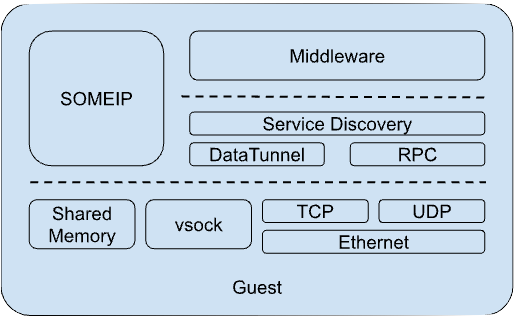
Figure 4. SDV Core serial support for debugging.
Within a single guest, SDV provides multiple options that depend on the communication model and performance requirements.
Vsock
Vsock is the preferred channel for local communication between multiple VMs or Host and VM. VMs should use direct vsock communication between each other to allow the implementation to optimize the number of copies.
Shared memory
Shared memory is only used to communicate with a VM for IPC (inter process communication), but not offered as a regular channel to communicate between multiple VMs. The host may use shared memory to share information with the guest, but it is not planned for high frequency networking traffic.
Ethernet
Ethernet is used for communication between multiple SoCs, that is, for in-vehicle communication. This can either be virtualized systems, but also native systems or legacy ECUs.
The vehicle network is small enough that the IPv4 address space is sufficient to identify all available systems. Nevertheless, to ensure that the system is compatible with potential uplinks and future development, IPv4 and IPv6 must be supported.
VLAN
VLAN is a mechanism to create virtual network architectures that allow to isolate different subnetworks and to form local networks. This can be used to create different security zones, and is used for that purpose within cars. VLAN support is required.
Protocols
TCP and UDP
Depending on the use-case, the system requires either a reliable or an unreliable, but fast communication protocol. Therefore, SDV Core supports both TCP and UDP.
Data Tunnel
Data Tunnel is a newly developed communication mechanism for SDV that offers a fast communication channel following the pubsub model, for example one application publishes a topic while one or more applications can listen to it. Internally, it either utilizes shared memory and FMQ (fast message queues) within the VM, or either vsock or Ethernet to communicate across VMs.
SDV RPC
SDV RPC implements remote procedure calls between SDV services using gRPC over
sockets, supporting unary, client-streaming, and server-streaming methods
defined in protobuf and Vehicle Services Interface Definition Language (VSIDL).
Service processes use local Binder IPC only to coordinate endpoint
registration, discovery, and TLS credentials with local SDV agents (such as
sdv_rpc_agent), while RPC traffic runs over local sockets within a VM and
over vsock or Ethernet (such as a dedicated SDV-RPC VLAN) across VMs and ECUs.
Frameworks
SOME/IP
SOME/IP is used to communicate with non-SDV systems such as AUTOSAR ECUs.
SOME/IP runs over TCP and UDP and doesn't require specialized hardware or
kernel drivers. AAOS SDV provides the SOME/IP broker agent, the ISomeIpStack
AIDL interface for integrating partner SOME/IP stacks, and a non-production
reference stack based on COVESA vsomeip.
Service discovery agent (SD Agent)
It provides service discovery, authentication and authorization to SDV. For communication, it may use any of the previously mentioned methods. For authentication and authorization, the SD Agent requires access to security hardware and a verified DICE chain of trust.
Middleware
The SDV middleware client library provides a unified API across these transports and works with VSIDL to define service interfaces and message schemas.
Neutral zone
To isolate parts of the system to prevent attacks from a less trusted part of the system (for example, IVI with custom installed apps), the network may introduce different zones, including demilitarized zones. In practice, this means that subnetworks are physically or logically separated, and only traffic on the allowlist can pass those borders.
Connectivity manager
In Android, it is a common practice to limit the number of applications and
services that can open socket connections themselves. Instead, a central
instance is responsible for opening and managing connections. Because SDV Core
doesn't include Android's Java framework services, it manages network
interfaces and socket access natively through SDV communication agents, VLANs,
and SELinux policies rather than Android's Java ConnectivityService.
Updatability
A key SDV features is the updatability. New features can be installed throughout the SDV lifetime through Android system updates and APEX packages.
Android system updates
Android provides A/B system updates, and SDV Core uses non-virtual A/B updates. A/B updates create each partition twice, which gives two advantages: the system can be updated in the background, and if the update fails, the system can roll back to the last known version to work.
APEX packages
In addition to splitting the system into multiple partitions and making them updatable, Android also provides APEX packages, a mechanism to put applications and libraries into small packages that can be installed and updated independently of system updates.
SDV Core uses APEX packages to deploy and update service bundles independently of full system updates. An APEX package can contain one or more service bundles signed with the same key, while each service bundle instance runs in its own process.
Because SDV Core doesn't include Android's Java package management stack, the
native apexd daemon and SDV Update Manager verify, stage, activate on reboot,
and roll back APEX updates natively. For more information, see
Update Manager.
Update management
SDV instances aren't fully independent units in the car, and need orchestration with other SDV instances and car services. For example, to install service dependencies or to ensure updates are only installed in a safe system state.
Multi-VM deployments coordinate updates across VMs through the system integrator's update client and each VM's Update Manager instance: there must be a primary VM to update shared partitions, and a mechanism to notify the other VMs about the updated partition and synchronization for updating all VMs at the same time to ensure the previous known working state is not broken.
Getting started
Get started with the software defined vehicle provides details about source code, building, and launching with Cuttlefish.