
Sizing app memory budgets by hand is slow and error-prone. A budget set near an app's unconstrained peak footprint leaves cold slack in RAM, whereas a guessed tight ceiling causes silent reclaim churn or jank. Repeating manual sweeps across lifecycle states, processes, display sizes, and RAM tiers is noisy and doesn't scale.
The app memory budget calibration tool at
development/tools/app_memory_budgets in the Android Open Source Project
(AOSP) trims an existing release Android Package (APK) resident footprint to
its active working set without app code changes or custom
onTrimMemory handlers. The tool gates every candidate
budget on both user-facing latency and kernel refault and CPU churn, and emits
per-state <memory-budget> XML with display scaling, calibrated on each device
RAM tier that you target. This tool automates the calibration workflow
described in Set app memory budgets and produces manifest
declarations enforced at run time by the Memory Limiter.
This page is for device manufacturers and platform engineers who calibrate
system and preloaded release APKs on Android 17 (API level 37) and higher. To
configure protection floors and ceilings for system_server and native
daemons, see System memory budgets instead.
Size budgets to the working set
When configuring app memory budgets for system or preloaded apps, the central challenge is sizing the budget for each lifecycle state so that the system reclaims idle memory without slowing down the app.
A naive approach is to run an app's critical user journeys (CUJs) without constraints and set the budget near the observed peak resident set size (RSS). That approach fails because it sizes the budget to the resident set rather than the active working set (see Understand working set versus resident memory, Understanding and troubleshooting Android memory, and Android memory fundamental concepts). Without memory pressure, an app's resident footprint retains cold slack: startup-only Dalvik Executable (DEX) code, one-time layout and shader caches, and uncollected heap allocations that the kernel can reclaim with little or no impact on app performance.
Automated calibration trims cold slack above the app's working set by applying
increasing levels of kernel reclaim pressure across repeatable CUJ trials. The
test harness budget_harness steps down the process or user ID (UID) cgroup v2
memory.high limit from unconstrained down to tight ceilings and compares each
candidate against interleaved unconstrained baselines. As the ceiling drops,
the calibration tool identifies the point where reclaim pressure stops trimming
cold slack, begins causing steady-state working-set page refaults, and
introduces the first measurable CPU or frame-time degradation. That inflection
point is the working-set knee.
The offline solver budget_solve resamples trials across bootstrap iterations
and
selects the conservative 90th-percentile knee as the recommended lab prototype
<memory-budget> declaration. Apply additional headroom for field variance
across user data and locales before production rollout as described in Pick
your budget.
Operating regimes across a sweep
As budget_harness lowers memory.high across a sweep, app telemetry
progresses through the three operating regimes shown in figure 1:
- Regime I (cold-cache trim): The
memory.highceiling sits above the active working set size (WSS). When the harness applies the budget, the kernel evicts cold file pages and compresses inactive anonymous pages into ZRAM (see Memory reclaim: eviction and swap), pulling peak RSS down along the 1:1 budget line. Throughout the workload, user experience (UX) metrics (frame jank percentage, 95th percentile frame time, warm-resume latency) and kernel work metrics (process CPU time, system CPU time, steady-state file and anonymous page refaults) remain within baseline noise tolerances. - Regime II (reclaim churn): The ceiling cuts into the active working set, but hardware headroom hides the pressure from the user. UI frame times and launch latencies still pass their thresholds, yet kernel CPU time and working-set refaults climb as the kernel pages active memory out and faults it back in. Shipping a Regime II budget drains battery, increases storage wear, and turns into visible jank when the device is under background load or thermal throttling.
- Regime III (UX regression): The ceiling is too low for the active
working set to stay resident during a single interaction pass. Frame jank
and 95th percentile frame times breach their gates, warm resume stalls, or
the process crashes or
lmkdterminates it.
Figure 1. Response curve across the three operating regimes as the soft memory ceiling decreases.
Calibration invariants
The calibration harness enforces four platform invariants so lab sweeps match how the Memory Limiter enforces budgets in production:
- Soft reclaim throttling only: App memory budgets configure cgroup v2
memory.highrather thanmemory.max(see What happens when an app exceeds its budget). Crossingmemory.hightriggers targeted kernel reclaim in the allocating process rather than an immediate out-of-memory (OOM) termination, so apps don't need customonTrimMemoryhandlers before adopting a calibrated budget. - Active states only, never cached: When a process enters a cached state
(
PROCESS_STATE_CACHED_ACTIVITYthroughPROCESS_STATE_CACHED_EMPTY), the platform retains itsbackgroundbudget (andnot-visiblesystem limit) alongside cached-app compaction and the cached apps freezer (see How budget states map to process states). The harness calibrates only the three active lifecycle buckets (foreground,perceptible, andbackground), which you must size from active workloads rather than idle cached residency. - Unconstrained cold launch: Cold startup faults in class loaders,
resources, and shader caches that aren't part of the steady-state working
set. Every trial launches the app with
memory.high = max, waits for initial settle, and applies the candidate budget only after the process enters the target lifecycle bucket. - Release build fidelity: Always calibrate non-debuggable,
R8-optimized release APKs compiled with Baseline
Profiles (
speed-profile). Debug builds carry instrumentation and unstripped symbols that inflate the working set.
A calibrated budget is only as representative as the seeded CUJs that the workload plugin exercises. For more information, see Seed deterministic on-device data.
Architecture
The calibration tool separates on-device measurement from statistical solving to support pooling multiple sweep runs, re-analyzing telemetry offline, and auditing individual trial records:
- On-device harness (
budget_harness.py): Host-side Python runner that controls a target device over Android Debug Bridge (ADB), manages cgroup v2 limits, runs app CUJ plugins, samples kernel and frame metrics at 1 Hz, and writes one JSON Lines (JSONL) record per trial. - Offline solver (
budget_solve.py): Statistical analyzer that validates trial records, compares candidate budgets against unconstrained baselines, identifies the working-set knee and its bootstrap confidence interval, fits display-scaling parameters, and outputs Markdown reports, JSON summaries, andAndroidManifest.xmlsnippets. - Workload plugins (
apps/<name>.py): Modular Python classes that subclassBaseAppto define deterministic foreground, perceptible, and background CUJs for AOSP and preloaded partner apps.
Process-state buckets and cgroup scoping
budget_harness evaluates each app per lifecycle bucket, mirroring the Memory
Limiter budget buckets (see Service bindings and process
states). The following table maps each --state flag to its
manifest state and ActivityManager process states:
| Harness flag | Manifest state | ActivityManager process states | Typical workloads |
|---|---|---|---|
--state fg |
foreground |
PERSISTENT, PERSISTENT_UI, TOP, BOUND_TOP, TOP_SLEEPING |
Visible activities, scrolling lists, camera preview, and services or providers bound by the top app. |
--state perc |
perceptible |
FOREGROUND_SERVICE, BOUND_FOREGROUND_SERVICE, IMPORTANT_FOREGROUND, IMPORTANT_BACKGROUND |
Media playback, navigation, active downloads, bound input method editors (IMEs), and launcher touch interaction services. |
--state bg |
background |
TRANSIENT_BACKGROUND, BACKUP, SERVICE, RECEIVER, HEAVY_WEIGHT |
JobScheduler jobs, sync adapters, broadcast receivers, and background services. budget_harness classifies HOME and LAST_ACTIVITY as cached, so --state bg trials must run the workload in one of the process states in this row. |
| Not calibrated | background (retained in cached) |
CACHED_ACTIVITY, CACHED_ACTIVITY_CLIENT, CACHED_RECENT, CACHED_EMPTY |
Idle cached apps retain their background budget and not-visible system limit alongside cached-app compaction, the freezer, and lmkd. |
The harness supports two cgroup scoping modes through --target:
- Whole-app UID scoping (
--target uid, default): Applies the budget across all processes sharing the package UID by writing to the UID cgroup (/sys/fs/cgroup/apps/uid_<UID>, or distributing acrossuid_<UID>/pid_<PID>leaf cgroups). Before the sweep starts, the harness runsam memory-limiter ignore <uid>andam memory-limiter syncfor app UIDs (UID 10000 and higher) so the platform limiter doesn't overwritememory.highduring a trial, and restoresam memory-limiter ignore noneon exit. - Per-process scoping (
--target proc:<process_name>): Resolves the running process ID (PID) of<process_name>from/proc/<PID>/cgroupand writes strictly to its depth-3 leaf cgroup (.../uid_<UID>/pid_<PID>/memory.high). Use per-process scoping when an app runs in a shared system UID such asandroid.uid.system(UID 1000, where UID-level throttling orignorewould affectsystem_server, as described in System memory budgets) or when calibrating a dedicated child process such as:persistentor a background Rich Communication Services (RCS) worker (see Multi-process apps). If a system process with UID under 10000 already declares a<memory-budget>in its manifest, runadb shell am memory-limiter ignore <uid>before the sweep andignore noneafterward so the limiter doesn't overwrite candidate ceilings. Because leaf cgroupmemory.currenttracks only pages charged to that process after fork, shared baseline pages are excluded automatically (see The Zygote process model).
Trial isolation and lifecycle execution
Each trial starts from a clean baseline. In cold start mode (the default for
non-persistent apps), the harness runs am force-stop <pkg>, drops the kernel
page cache (echo 3 > /proc/sys/vm/drop_caches), resets memory.high to max,
and launches the app using the plugin's launch and prepare hooks. Figure 2
shows how trial execution then branches by target state, applying the candidate
budget at the point where each state's workload begins.
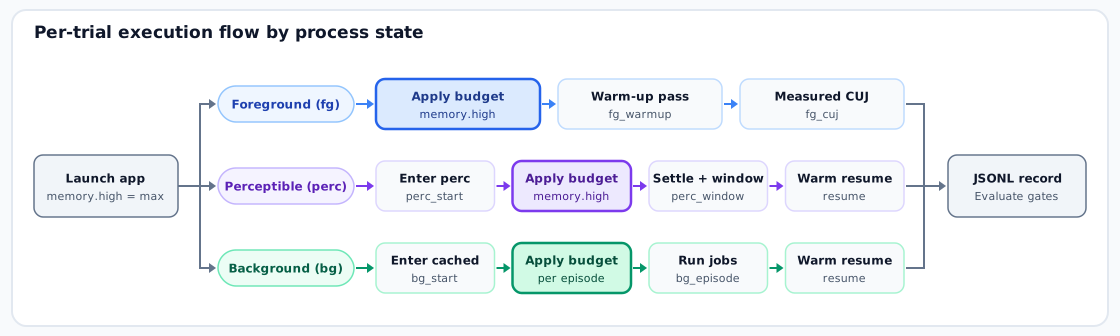
Figure 2. Per-trial execution flow across foreground, perceptible, and background states.
After initial launch and SETTLE_S settle, the three state pipelines run as
follows:
- Foreground (
fg): The harness writes the candidate budget tomemory.high, runsfg_warmupunder the candidate budget so the kernel evicts one-time cold startup pages before measurement begins, resetsdumpsys gfxinfo, snapshots cgroup and CPU counters, and runsfg_cujwhile a 1 Hz sampler pollsmemory.current,memory.stat, and process-state residency. - Perceptible (
perc): The plugin'sperc_starthook starts the perceptible workload (such as audio playback or putting another activity in front of a bound service) and leaves the foreground UI. After the harness verifies that the target entered thepercbucket, it writes the candidate budget tomemory.high, waitsPERC_SETTLE_Sunder the budget so initial transition reclaim finishes, runsperc_probe, and measures steady-state churn acrossPERC_WINDOW_S. Finally, the harness callsresumeandpost_resumeto measure warm-resume latency (warm_resume_ms) and post-resume frame jank (post_jank_pct), automating the check in Validate non-foreground budgets with a warm return. - Background (
bg): Because Android apps return to thecachedbucket between bursts of background work, the harness models background execution as a sequence ofBG_EPISODESepisodes separated byBG_GAP_Sidle gaps. Afterbg_startplaces the app in the cached state withmemory.high = max, each episode applies the candidate budget and invokesbg_episodeto trigger registeredJobSchedulerjobs withcmd jobscheduler run -f <pkg> <job_id>, waiting until each job leaves the active queue. Between episodes, the harness resetsmemory.hightomaxwhile the app idles incached. After all episodes complete, the harness measures warm resume andpost_resumejank.
How the solver selects a budget
When you pass --budgets auto, budget_harness measures an initial
unconstrained baseline (max) and constructs a descending budget ladder
automatically,
interleaving fresh unconstrained baselines every few steps to account for
thermal or background drift. After a candidate budget triggers Regime III UX
failures, the harness brackets between the lowest passing budget and the first
failing budget and runs extra repetitions around the provisional knee.
Single-device UI benchmarks have run-to-run variance, so a tight budget can
occasionally pass one trial even after a higher budget already started
thrashing. When budget_solve analyzes the JSONL file, it filters out invalid
trials (such as trials where memory.high was externally overwritten or where
bucket residency fell under 80%), fits a monotonic response curve across
descending budgets, and selects the lowest budget where that curve and all
higher budgets pass every UX and kernel churn gate. budget_solve also
resamples trials within each budget step (default 200 bootstrap iterations) to
report a
10th-to-90th-percentile confidence interval around the knee and selects the
conservative 90th-percentile knee (knee_p90_mb, reported as recommended_mb
in --json output). If the p10 and p90 bounds span more than one step,
re-run with a higher --knee-reps count to tighten the interval.
budget_solve classifies every candidate budget against the unconstrained
baseline using the pass criteria in the following table:
| Lifecycle state | Regime III (UX failure) thresholds | Regime II (reclaim churn) thresholds |
|---|---|---|
fg |
jank_pct (+1.0 pt), p95_ms (+3.0 ms), plugin ux_lower_* / ux_higher_* (UX_TOL or 10%) |
cpu_ms (+50 ms or 5%), cpu_sys_ms (+30 ms or 15%), steady_refault_file_delta (+1,500 pages or 50%), steady_refault_anon_delta (+1,000 pages or 50%) |
perc (windowed) |
warm_resume_ms (+45 ms or 15%), post_jank_pct (+1.0 pt), plugin ux_* |
cpu_ms_per_s (+2 ms/s or 5%), cpu_sys_ms_per_s (+1 ms/s or 15%), refault_file_per_s (+50 pages/s or 50%), refault_anon_per_s (+35 pages/s or 50%) |
perc (PERC_FIXED_WORK = True) |
warm_resume_ms (+45 ms or 15%), post_jank_pct (+1.0 pt), plugin ux_* |
Same total-work churn thresholds as fg |
bg |
warm_resume_ms (+45 ms or 15%), post_jank_pct (+1.0 pt), ux_lower_episode_ms (+250 ms or 10%), ux_higher_jobs_ok_frac (-10%) |
cpu_ms (+20 ms or 5%), cpu_sys_ms (+10 ms or 15%), steady_refault_file_delta (+200 pages or 50%), steady_refault_anon_delta (+100 pages or 50%) |
Verify device and kernel prerequisites
Before running a calibration sweep on an AOSP or partner test device, verify that the environment meets the following prerequisites:
- Root ADB access (
userdebugorengsystem image with release APKs):budget_harnessrequiresadb rootto write/proc/sys/vm/drop_cachesand read per-process/proc/<PID>/smaps_rollupand cgroup files. The target app APK must be a release build compiled with R8 optimizations and baseline profiles. Depth-3 per-process memory cgroup hierarchy (
uid_<UID>/pid_<PID>): Process scoping and Memory Limiter enforcement require writablememory.highand readablememory.statfiles at both theuid_<UID>andpid_<PID>cgroup levels (/sys/fs/cgroup/apps/uid_<UID>/pid_<PID>on slice layouts or/sys/fs/cgroup/uid_<UID>/pid_<PID>on flat layouts, see Cgroup abstraction layer). Verify that the kernel mounts cgroup v2 with depth-3memorycontrollers enabled:adb root # system_server always runs, so its cgroup shows whether depth-3 is active. PID=$(adb shell pidof -s system_server) # Extract the unified cgroup v2 (hierarchy 0) path from /proc/<PID>/cgroup. CG=$(adb shell "grep '^0::' /proc/$PID/cgroup | cut -d: -f3") adb shell "ls -l /sys/fs/cgroup$CG/memory.high /sys/fs/cgroup$CG/memory.stat"If
memory.highis missing underuid_<UID>/pid_<PID>, enable thememorycontroller incgroup.subtree_controlacross the root, slice, anduid_<UID>levels in your vendorinit.rcconfiguration and confirm thatmemory.highis writable bysystem_server(system:system, mode0664).Multi-generational least recently used (MGLRU) alignment: On Linux 6.1 and higher kernels, confirm that MGLRU is enabled (
/sys/kernel/mm/lru_gen/enabledreads non-zero).budget_harnessrecords the device's MGLRU and ZRAM state in therun_headerof every JSONL output file and aborts immediately during preflight if depth-3memory.highisn't writable.Thermally stable, unlocked screen: Connect the device over a reliable USB or local ADB bridge, disable auto-lock, and allow skin temperature to settle before starting a sweep.
Run calibration sweeps
Run budget_harness and budget_solve directly with python3 from
development/tools/app_memory_budgets or build them as host binaries with
Soong (m budget_harness budget_solve app_memory_budgets_solve_test).
Calibrate a single process state
Run budget_harness.py with --serial, --app, --state, and --out, and
then pass the resulting JSONL files to budget_solve.py:
cd development/tools/app_memory_budgets

# 1. Run an adaptive foreground sweep on AOSP Launcher3
python3 budget_harness.py \
    --serial "$ANDROID_SERIAL" \
    --app apps/launcher3.py \
    --state fg \
    --target uid \
    --budgets auto \
    --reps 2 \
    --knee-reps 5 \
    --out /tmp/launcher3_fg.jsonl

# 2. Run a perceptible sweep on Launcher3 (bound TouchInteractionService),
#    skipping setup because step 1 already seeded the device
python3 budget_harness.py \
    --serial "$ANDROID_SERIAL" \
    --app apps/launcher3.py \
    --state perc \
    --target uid \
    --budgets auto \
    --skip-setup \
    --out /tmp/launcher3_perc.jsonl

# 3. Solve both sweeps and generate a Markdown report and manifest XML snippet
python3 budget_solve.py /tmp/launcher3_fg.jsonl /tmp/launcher3_perc.jsonl \
    --md /tmp/launcher3_report.md \
    --xml /tmp/launcher3_budget.xml
The following table summarizes the command-line flags for budget_harness.py:
| Flag | Default | Description |
|---|---|---|
--serial <serial> |
Required (sweep) | Target ADB device serial number (not required with --gate). |
--app <path_or_name> |
Required | Plugin path (for example, apps/launcher3.py) or built-in plugin name. |
--out <path> |
Required (sweep) | Output JSONL path (append-safe across resumed or pooled runs, and not required with --gate or --list-jobs). |
--state {fg,perc,bg} |
fg |
Target lifecycle bucket to calibrate. |
--target {uid,proc:<name>} |
uid |
Scope budget to the whole package UID or a single named process. |
--budgets {auto,<csv>} |
auto |
Adaptive descending ladder, or a comma-separated list of budgets in mebibytes (MiB) such as 300,250,200 (or max for baseline only). |
--fractions <csv> |
'' |
Explicit comma-separated fractions of baseline peak memory (the higher of initial or peak RSS, for example, 0.9,0.7,0.5), overriding the default per-state ladder (0.9 to 0.3 for fg and perc, 0.8 to 0.1 for bg). |
--reps <N> |
2 | Trial repetitions per candidate budget step. |
--knee-reps <N> |
5 | Total repetitions at the provisional knee and its immediate neighbors. |
--baseline-every <N> |
4 | Interleave an unconstrained baseline trial every N budget steps. |
--stop-after-fails <N> |
2 | Stop the coarse descent after N consecutive Regime III UX failures. |
--start {cold,warm} |
cold |
Force-stop and drop caches before each trial (cold) or reuse the running process (warm). |
--display <spec1,spec2> |
None | Alternate display configurations every trial (fold:folded,fold:unfolded or size:WxH, where an empty size: resets to native physical resolution with wm size reset). |
--baseline-only <N> |
0 | Run N unconstrained baselines per display config for the display-scaling screen. |
--bracket-step <MiB> |
5 with --display, else 0 |
Finest step size in MiB when bracketing between the provisional knee and first failure. |
--skip-setup |
Off | Skip the plugin's setup hook, for example when an earlier sweep in the same session already seeded the device. |
--seed <N>, --device-label <str> |
Auto | Set the random seed for trial shuffling, or override the <device>_<sdk> label in JSONL output. |
--gate, --list-jobs |
False |
Run the zero-ADB static display-scaling check and exit, or list registered JobScheduler jobs on the device and exit. |
budget_solve.py accepts one or more JSONL files and supports the following
flags:
--md <path>: Write a Markdown summary report.--xml <path>: Write anAndroidManifest.xmlprototype snippet.--json <path>: Write a machine-readable JSON report.--screen: Print the display-scaling baseline screen verdict.--pixel-range {all,phone,<min_mp>,<max_mp>}: Set the supported display range in megapixels (defaultall).--pool: Merge separate harness runs of the same app, state, target, and device across differentrun_idvalues.--ux-tol <key>=<value>,...: Override absolute UX tolerances.--bootstrap <N>: Set the bootstrap resampling count (default200).--seed <N>: Set the bootstrap random seed (default0).
Scale budgets across display sizes
For UI-intensive apps, render surfaces, GPU texture caches, and decoded bitmaps
(see Bitmaps and memory) scale with the active window pixel
area (WindowMetrics.getBounds width ×
height). Display scaling matters in two common scenarios:
- One APK across multiple devices: A single preinstalled or distributed APK ships across a wide range of devices, from compact 720p and 1080p phones to QHD+ phones and large-screen tablets.
- Dynamic display and window changes at run time: On a single device, the active window area changes when a user resizes a freeform app window in desktop windowing mode, unfolds a foldable phone between its cover screen and inner display, or switches the screen resolution in system settings.
A flat foreground budget sized for a tablet or expanded desktop window leaves
over 100 MiB of unthrottled slack on a compact phone screen, whereas a flat
budget calibrated on a compact screen starves the same APK on a larger display.
As shown in figure 3, <memory-budget> matches the budget to the active window
area by combining a fixed baseline (android:maxMb, covering non-UI code,
heaps, and database caches) with a linear per-pixel allowance
(android:additionalBytesPerDisplayPixel, multiplied by active window
width × height, as described in Scale budgets for high-density
displays).
Figure 3. Display-scaled memory budgets across multidevice screens, unfolding postures, and resizable desktop windows.
Because a two-display sweep takes roughly twice as long as a single-display sweep, use the following three-step workflow so that two-point sweeps run only when display size materially changes the working set:
Run the static gate check (
--gate): Inspects the plugin attributes without touching a device. The check rejects targets listed inWINDOWLESS_PROCS(such as:rcsor:background), rejectsbgsweeps, and rejectspercsweeps unless the plugin setsPERC_KEEPS_UI = True:python3 budget_harness.py --app apps/filesapp.py --state fg --gateRun a baseline display screen (
--baseline-only 3): Runs three unconstrained trials at two display sizes (about 10 to 15 minutes total) to test whether the app's footprint grows with pixel count. Test synthetic resolution overrides on any phone or tablet (--display size:1080x2400,size:, where trailingsize:resets to the panel's native resolution) or physical postures on a foldable device (--display fold:folded,fold:unfolded):# Alternate synthetic 1080x2400 and native physical resolution (size:) python3 budget_harness.py \ --serial "$ANDROID_SERIAL" \ --app apps/filesapp.py \ --state fg \ --display size:1080x2400,size: \ --baseline-only 3 \ --out /tmp/files_screen.jsonl python3 budget_solve.py --screen /tmp/files_screen.jsonlIf the footprint growth across display sizes saves at least 15 MiB (and at least 10% of the smaller display's footprint),
budget_solve --screenreportsVerdict: go. Otherwise, it reportsVerdict: no-goand a single flatandroid:maxMbbudget is sufficient.Run a two-point interleaved sweep and linear fit: When the baseline screen returns
go, runbudget_harness.pywith--displayto alternate display sizes every trial so thermal drift affects both configurations equally, and then pass the output tobudget_solve.py --xmlto fitandroid:maxMbandandroid:additionalBytesPerDisplayPixel:python3 budget_harness.py \ --serial "$ANDROID_SERIAL" \ --app apps/filesapp.py \ --state fg \ --display size:1080x2400,size: \ --out /tmp/files_sweep.jsonl python3 budget_solve.py /tmp/files_sweep.jsonl \ --md /tmp/files_display_report.md \ --xml /tmp/files_budget.xml
Declare calibrated budgets in the manifest
When integrating the XML snippet emitted by budget_solve.py --xml into an
app's release AndroidManifest.xml, follow the declaration rules in
Declare budgets in the Android manifest:
- Add production headroom to the lab prototype:
budget_solve --xmlemits the calibrated lab prototype (the 90th-percentile bootstrap knee). Before shipping in a production image, pad that prototype for real-world user database sizes, locales, and original equipment manufacturer (OEM) framework variance as described in Pick your budget. Consistent with the Memory Limiter,android:maxMband--budgetsrepresent binary mebibytes (1 MiB = 1,048,576 bytes). - Place budget tags inside the app or process element: Place
<memory-budget>inside<application>or<process>. Tags placed directly under<application>apply to every process in the APK that doesn't declare its own<process>block. To budget specific processes independently (calibrated with--target proc:<name>), declare them inside<application><processes><process android:process="...">(see Multi-process apps). Order clauses from foreground to background, and general to specific: At run time, the platform evaluates
<memory-budget>elements in declaration order, and the last applicable clause takes effect (see Resolution rule: last applicable clause takes effect). An omittedandroid:statedefaults toforegroundand cascades toperceptibleandbackgroundunless overridden by a later clause for those states. Always order clauses fromforegroundtoperceptibletobackground(placing general clauses beforeandroid:featureoverrides within each state) so a laterforegroundclause never shadows an earlierperceptibleorbackgroundbudget:<application> <!-- General baseline budget for foreground UI --> <memory-budget android:state="foreground" android:maxMb="115" android:additionalBytesPerDisplayPixel="66" /> <!-- Tighter budget when perceptible without a visible window --> <memory-budget android:state="perceptible" android:maxMb="75" /> <!-- Minimal budget during active background jobs --> <memory-budget android:state="background" android:maxMb="60" /> </application>Omit the background state if the app performs no background work: Never add an artificial low
android:state="background"clause to shrink an idle cached app. The platform continues to enforce thebackgroundbudget in the cached state alongside cached-app compaction and the freezer, and setting an artificially lowbackgroundbudget can over-reclaim warm state or throttle any brief background transition. Only declare abackgroundbudget when the app runsJobSchedulerjobs, sync adapters, or background services calibrated with--state bg.
Reference AOSP workload plugins
The development/tools/app_memory_budgets/apps/ directory includes seven
reference workload plugins that run out of the box on AOSP builds:
launcher3.py (com.android.launcher3), settings.py
(com.android.settings), filesapp.py (com.android.filesapp), messaging.py
(com.android.messaging), latinime.py (com.android.inputmethod.latin),
dialer.py (com.android.dialer), and traceur.py (com.android.traceur).
Each plugin demonstrates a reusable calibration pattern.
Understand the plugin contract
Every plugin defines a class named App that subclasses BaseApp from
budget_harness. The following table lists the attributes and lifecycle hooks
on BaseApp:
| Attribute or hook | Default | Purpose |
|---|---|---|
NAME, PKG, COMPONENT, UI_PROC |
'' |
Short report identifier, package name, launch activity component, and gfxinfo process name (defaults to PKG). |
PERSISTENT, MIN_FRAMES |
False, 30 |
Mark persistent processes that can't be force-stopped, and set the minimum rendered frame count required for a valid fg trial. |
SETTLE_S, PERC_SETTLE_S, PERC_WINDOW_S, BUCKET_TIMEOUT_S |
2, 10, 30, 15 | Post-launch settle time (seconds), post-budget settle time in perc, perceptible observation window, and bucket transition timeout. |
PERC_FIXED_WORK, PERC_KEEPS_UI |
False, False |
Use total-work churn thresholds instead of per-second rates in perc, or mark a perc state that retains a live UI surface (such as picture-in-picture). |
BG_JOBS, BG_JOBS_EXCLUDE, BG_EPISODES |
(), (), 5 |
Regular expression filters matching dumpsys jobscheduler job names to trigger in bg sweeps, and episode count per trial (with 30 s BG_JOB_TIMEOUT_S and BG_CACHED_TIMEOUT_S defaults). |
DISPLAY_CONFIGS, WINDOWLESS_PROCS, UX_TOL |
(), (), {} |
Ordered display configs for --gate, windowless process suffixes, and custom UX metric tolerances (merged onto {'ux_lower_episode_ms': 250.0}). |
setup |
No-op | Unless you pass --skip-setup, runs once before the sweep to seed deterministic media, contacts, or databases and grant runtime permissions. |
launch, prepare |
am start -W -n COMPONENT |
Cold-starts the activity under memory.high = max and navigates past onboarding dialogs to the CUJ starting surface. |
fg_warmup, fg_cuj |
fg_warmup calls fg_cuj |
Runs the pre-measurement warm-up pass under budget and the timed 15- to 25-second foreground interaction pass. |
perc_start, perc_window, perc_probe, perc_ux |
Sleep PERC_WINDOW_S |
Transitions the app into the perceptible bucket, drives or observes perceptible work, probes service health before and after the window, and returns custom ux_* checks. |
bg_start, bg_episode, bg_ux |
Runs BG_JOBS |
Sends the app to Home until cached, triggers discovered JobScheduler jobs under the candidate budget, and aggregates episode latency and completion fraction. |
resume, post_resume |
am start -W, fg_warmup |
Warm-resumes the app after a perc or bg window and runs a short interaction pass to measure post_jank_pct. |
Calibrate a home launcher
apps/launcher3.py calibrates AOSP Quickstep (com.android.launcher3) across
both fg and perc states:
- Foreground (
fg): Pages horizontally across the home workspace, flings up and down through the All Apps drawer, and touches & holds the workspace to open and scroll the Widgets bottom sheet. All gestures use resolution-independent percentage coordinates (self.d.swipe_pct) and accessibility node selectors (self.d.tap_node(text='Widgets', contains=True)) so the same plugin runs unchanged across phones, tablets, and foldables. - Perceptible (
perc): On Android devices using gesture navigation,SystemUIbinds Launcher'sTouchInteractionServicewithBIND_FOREGROUND_SERVICE(see Service bindings and process states), keeping the launcher process in thepercbucket whenever another app is in the foreground.perc_startlaunches Settings in front of Launcher3, andperc_probeandperc_uxverify that the launcher PID survives the 20-second perceptible window without being terminated and restarted (ux_ok):
  def perc_start(self):
    pids = self.d.pids(self.UI_PROC)
    self._start_pid = pids[0] if pids else None
    # Put Settings in the foreground while SystemUI keeps Launcher3's
    # TouchInteractionService bound in the perceptible bucket.
    self.d.sh('am start -W -a android.settings.SETTINGS >/dev/null 2>&1')
    time.sleep(1.5)

  def perc_probe(self):
    pids = self.d.pids(self.UI_PROC)
    pid = pids[0] if pids else None
    svc_out = self.d.sh(f'dumpsys activity services {self.PKG}')
    tis_bound = 'TouchInteractionService' in svc_out
    return dict(
        pid=pid,
        adj=self.d.oom_adj(pid) if pid else None,
        tis_bound=tis_bound,
    )

  def perc_ux(self, before, after, wall_s):
    del wall_s
    same_pid = (
        after.get('pid') is not None
        and after.get('pid') == before.get('pid') == self._start_pid
    )
    return dict(ux_ok=bool(same_pid))
Scope a single process in a shared system UID
apps/settings.py calibrates com.android.settings. Because Settings shares
android.uid.system (UID 1000) with system_server and other platform
packages, calibrate it using --target proc:com.android.settings so UID-level
cgroup changes don't affect system_server:
python3 budget_harness.py \
    --serial "$ANDROID_SERIAL" \
    --app apps/settings.py \
    --state fg \
    --target proc:com.android.settings \
    --out /tmp/settings_fg.jsonl
apps/settings.py also illustrates warm-up symmetry. When fg_cuj navigates
into deep subpages (APPLICATION_SETTINGS, POWER_USAGE_SUMMARY,
INTERNAL_STORAGE_SETTINGS, DISPLAY_SETTINGS), fg_warmup visits and scrolls
those exact same subpages before the measured pass. If fg_warmup only scrolls
the top-level dashboard, subpage fragment classes and preference XML resources
fault in from disk for the first time during fg_cuj, causing spurious
steady_refault_file_delta churn failures under tighter budgets:
  def fg_warmup(self):
    d = self.d
    d.return_to(self.COMPONENT, pause=0.5)
    self._scroll_down_up(passes=1)
    for action in SUBPAGE_ACTIONS:
      d.sh(f'am start -W -a {action} >/dev/null 2>&1')
      time.sleep(0.5)
      self._scroll_down_up(passes=1)
    d.return_to(self.COMPONENT, pause=0.5)
Seed deterministic on-device data
Calibrating an app on an empty factory-reset device underestimates its working
set: scrolling an empty file list or an empty SMS inbox exercises almost no
recycler view holders, bitmap caches, or SQLite cursors. Both apps/filesapp.py
and apps/messaging.py (apps/messages_seed.py) seed deterministic data sets
on the device inside setup:
- Files (
apps/filesapp.py): Targetscom.android.filesappand checks whether/sdcard/Download/AppMemoryBudgetDocsalready contains at least 80 files. If not,setupgenerates 80 synthetic documents on the device and broadcastsMEDIA_SCANNER_SCAN_FILEsoMediaProviderindexes them before the first trial. - Messaging (
apps/messaging.pyandapps/messages_seed.py): Grantscom.android.messagingtheandroid.app.role.SMSrole, queriescontent://smsto check whether the inbox is already populated, and runs a generated shell script that seeds 40 conversations and 29 contacts (including a 160-message thread) sofg_cujscrolls through realistic conversation lists and message histories.
Calibrate bound input methods and background jobs
For components that don't launch from a home screen icon or that run periodic
background work, BaseApp provides two specialized patterns:
- Bound IME (
apps/latinime.py):com.android.inputmethod.latinhas no main launcher activity. Instead,setupenables and selectsLatinIMEusingime enableandime set,launchopenscom.android.dialeras a host app, andpreparetaps the contact search bar and types a pangram so the keyboard loads its dictionary and gesture models. Inperc_start, pressing Back and Home dismisses the keyboard UI whilesystem_serverkeepsLatinIMEbound in the perceptible bucket. Scheduled background jobs (
BG_JOBS): None of the bundled AOSP sample plugins pre-populateBG_JOBS, because background job IDs vary across apps. To calibrate--state bgfor an app that runs periodicJobSchedulertasks, first inspect the jobs registered by your plugin's package on the device with--list-jobs:python3 budget_harness.py \ --serial "$ANDROID_SERIAL" \ --app apps/my_oem_app.py \ --list-jobsSet
BG_JOBSon yourBaseAppsubclass to a tuple of regular expressions matching the deterministic background jobs you want to exercise (and exclude long-running or network-gated jobs inBG_JOBS_EXCLUDE). During each background trial,BaseApp.bg_episodetriggers the matching job IDs under the candidate budget and records completion status and episode wall time:class App(BaseApp): NAME = 'my_oem_app' PKG = 'com.example.oemapp' # Exercise local sync and indexing jobs, skip network-gated uploads. BG_JOBS = (r'SyncJobService', r'IndexRebuildJob') BG_JOBS_EXCLUDE = (r'CloudBackupJob',) BG_EPISODES = 5
Author and validate a custom plugin
When writing a new plugin in apps/<your_app>.py for a custom OEM system app or
preload (such as a launcher, gallery, browser, camera, or settings app), follow
these guidelines to prevent noisy sweeps and false knees:
- Maintain strict warm-up and CUJ surface symmetry: By default,
BaseApp.fg_warmupdelegates tofg_cuj. Only overridefg_warmupif you need a shorter iteration count, and make surefg_warmupvisits every activity, tab, dialog, and media decoder thatfg_cujvisits. - Use resolution-independent selectors and percentage coordinates: Never
hardcode pixel coordinates (
input tap 540 1200), which break across phones, foldables, and density modes. Useself.d.tap_node,self.d.wait_node, andself.d.swipe_pct. If a gesture computes pixel coordinates fromself.wandself.h, recompute them insideon_display_change. - Avoid UI hierarchy dumps during 60 fps playback or animations:
uiautomator dumpwaits for a 500 ms UI idle gap and times out after 10 seconds when a video player, camera preview, or continuous animation renders at 60 fps. Tap controls before starting playback, or verify playback state usingdumpsys media_sessionanddumpsys windowrather thanuiautomator dump. - Fail loudly during setup when preconditions are missing: In
setup, never silence errors with|| trueonsqlite3,pm grant, or file-push commands, and raiseRuntimeErrorif required seed media or accounts are absent so the sweep halts immediately instead of benchmarking an error dialog. - Scope multi-process apps accurately: Before running
--target uidon a multi-process app, checkadb shell "ps -A -o PID,UID,ARGS | grep <pkg>"andadb shell cmd activity get-uid-state <uid>. If a companion process (such as a persistent RCS, push, or wear listener service) pins the UID inFOREGROUND_SERVICE(see Service bindings and process states), a UID-scoped--state bgsweep fails residency validation (wrong_bucket). Calibrate each process independently with--target proc:<process_name>. Validate with unit tests and screenshots before a full sweep: Run
budget_solve_test.pyto test the solver and verify that everyapps/*.pyplugin loads and instantiatesBaseAppcleanly, and then run a single baseline trial withBUDGET_SHOTS_DIRset to inspect captured PNG screenshots atafter_prepare,after_warmup, andafter_cuj:# 1. Run solver unit tests and plugin instantiation checks python3 budget_solve_test.py # 2. Capture stage screenshots on a single unconstrained trial BUDGET_SHOTS_DIR=/tmp/shots python3 budget_harness.py \ --serial "$ANDROID_SERIAL" \ --app apps/my_oem_app.py \ --state fg \ --budgets max \ --reps 1 \ --out /tmp/sanity.jsonl
Interpret calibration results
The following illustrative budget_solve.py summaries from Android 17 release
builds show how to read single-state sweeps, per-process scoping, and
display-scaled sweeps across device tiers.
Inspect foreground and background sweeps
On a 16 GB phone, calibrating the main UI process of a contacts app
(--target proc:com.android.contacts) in --state fg across a 300-contact
database measures an unconstrained peak RSS of 234 MiB. As the budget steps
down from 295 MiB to 215 MiB, peak RSS tracks the ceiling down to
215 MiB while frame jank (0.5%), 95th percentile frame time
(8.0 to 8.5 ms), and CPU time stay flat. At 200 MiB, steady-state file
refaults jump from 711 pages to 1,933.5 pages (exceeding the
1,500-page threshold), marking the transition into Regime II, and tightening
further to 140 MiB triggers Regime III frame jank. budget_solve.py prints
the following summary and places the recommended lab knee at 215 MiB:
contacts / fg / proc:com.android.contacts / unloaded / cold / phone_16gb_37
Knee: 215 MiB (bootstrap p10/p50/p90: 215/215/215), recommended: 215 MiB
First non-Regime-I budget: 200 MiB. Baseline reps: 7.

budget  reps  regime  peak  swap  jank%  p95_ms   cpu_ms  sys_ms  srf_file  srf_anon  failed_gates
   max     7    base   234     0    0.5     8.0  20367.1  7006.8       0.0       0.0  (tol: jank +1.0, srf_file +1500)
   295     2       I   227     0    0.6     8.5  21500.2  7702.6       0.0       0.0  -
   255     2       I   233     0    0.5     8.0  19853.2  6749.0       0.0       0.0  -
   235     2       I   222     0    0.5     8.0  19609.9  6775.1       0.0       0.0  -
   215     4       I   215     1    0.5     8.5  19770.3  6780.8     711.0     217.0  -
   200     4      II   200    25    0.6     8.0  20312.8  7296.9    1933.5     974.0  srf_file > 1500
   175     2      II   175    40    0.7     9.5  19693.5  6843.6    1875.5    3333.5  srf_file > 1500, srf_anon > 1000
   140     2     III   140    68    2.4    13.2  22410.0  8915.4    6420.0    5810.0  jank_pct > 1.5, p95_ms > 11.0
Calibrating the same contacts process in --state bg across its JobScheduler
episodes finds an unconstrained peak of 72 MiB, a raw median knee of
60 MiB, and a conservative 90th-percentile recommended lab budget of
70 MiB (with 50 MiB entering Regime II across cpu_sys_ms, file
refaults, and anonymous refaults):
contacts / bg / proc:com.android.contacts / unloaded / cold / phone_16gb_37
Knee: 60 MiB (bootstrap p10/p50/p90: 60/65/70), recommended: 70 MiB
First non-Regime-I budget: 50 MiB. Baseline reps: 7.

budget  reps  regime  peak  swap  resume_ms  post_jank%  cpu_ms  sys_ms  srf_file  srf_anon  failed_gates
   max     7    base    72     0       41.0         0.0  1202.7   418.4       0.0       0.0  (tol: sys +69.4, srf_file +200)
    75     2       I    67     0       44.0         0.0  1300.4   409.1       0.0       0.0  -
    70     2       I    69     0       42.5         0.0  1335.4   379.6       0.5       0.0  -
    65     3       I    64     0       40.0         0.5  1450.7   507.8     109.0       0.0  -
    60     3       I    59     1       37.0         0.0  1404.1   465.5     161.0      36.0  -
    50     2      II    56     7       37.5         0.5  1559.4   556.2     442.5     245.0  cpu_sys_ms, srf_file, srf_anon
Inspect a display-scaled sweep
On a 16 GB foldable, running the baseline display screen
(--baseline-only 3 --display fold:folded,fold:unfolded) on apps/filesapp.py
shows that expanding the active display from 2.55 megapixels (MP)
(1080x2364) to 4.47 MP (2076x2152) increases dumpsys meminfo Graphics
memory from 197.5 MiB to 306.9 MiB and raises peak cgroup RSS by
55.2 bytes per pixel:
Display screen: filesapp / fg / uid / foldable_16gb_37

display          MP  reps  settled   peak  graphics
fold:folded    2.55     3    110.7  329.3     197.5
fold:unfolded  4.47     3    138.0  430.1     306.9

Growth (bytes/px): settled 15.0, peak 55.2 (bootstrap p10/p90: 47.6/59.0)
Verdict: go (projected flat-budget waste 126.9 MiB >= 15.0 MiB)
Proceeding to the two-point interleaved sweep yields recommended lab knees of
275 MiB on the 2.55 MP cover display and 395 MiB on the
4.47 MP inner display, and budget_solve.py --xml fits
android:maxMb="115" plus android:additionalBytesPerDisplayPixel="66":
Display scaling: filesapp / fg / uid / foldable_16gb_37

display             px    MP  baseline_peak  knee  recommended  fitted
fold:folded    2553120  2.55            318   275          275     275
fold:unfolded  4467552  4.47            453   385          395     395

Fit: maxMb 115 + 66 bytes/px (raw slope 65.7 bytes/px, p10/p50/p90: 60.2/60.2/65.7)
Span across 2.06..4.47 MP: 244.7..396.4 MiB (flat-budget waste: 151.7 MiB >= 24.5 MiB)
Decision: scaled (android:maxMb="115", android:additionalBytesPerDisplayPixel="66")
Passing --xml writes the corresponding <memory-budget> manifest prototype:
<!-- Package: com.android.filesapp (lab prototype before field headroom) -->
<application>
    <memory-budget
        android:state="foreground"
        android:maxMb="115"
        android:additionalBytesPerDisplayPixel="66" />
</application>
Compare results across devices and states
The following table summarizes representative calibration knees measured across device tiers, scoping modes, and process states:
| Device tier | Workload and target scope | State | Unconstrained peak RSS | Recommended lab knee | Primary Regime II boundary signal |
|---|---|---|---|---|---|
| 6 GB phone | Media catalog app (uid) |
fg |
562 MiB | 480 MiB | steady_refault_file_delta and cpu_sys_ms at 440 MiB |
| 6 GB phone | Media catalog app (uid) |
perc |
245 MiB | 180 MiB | refault_anon_per_s and warm_resume_ms at 160 MiB |
| 8 GB phone | Video streaming app (uid) |
fg |
312 MiB | 250 MiB | steady_refault_anon_delta at 225 MiB |
| 16 GB phone | Contacts main process (proc:com.android.contacts, 300 contacts) |
fg |
234 MiB | 215 MiB | steady_refault_file_delta (1,933.5 pages) at 200 MiB |
| 16 GB phone | Contacts main process (proc:com.android.contacts) |
bg |
72 MiB | 70 MiB | cpu_sys_ms (+137.8 ms) and steady_refault_file_delta at 50 MiB |
| 16 GB phone | Contacts persistent listener (proc:com.android.contacts:persistent) |
perc |
23 MiB | 16 MiB | refault_anon_per_s at 14 MiB (Zygote shared pages excluded from leaf cgroup) |
| 16 GB foldable | Files (uid, fold:folded 2.55 MP / fold:unfolded 4.47 MP) |
fg |
318 MiB / 453 MiB | 115 MiB + 66 bytes/px (275 MiB / 395 MiB) | steady_refault_file_delta at 270 MiB (folded) and 375 MiB (unfolded) |
Troubleshoot calibration sweeps
The following table lists common calibration warnings emitted by
budget_harness.py and budget_solve.py, along with their causes and fixes:
| Solver warning | Root cause | Resolution |
|---|---|---|
invalid rows excluded: limit_overwritten xN |
The Memory Limiter or a vendor daemon overwrote memory.high during the trial window because the UID wasn't ignored or the process changed lifecycle buckets while the Memory Limiter was active. |
Verify that am memory-limiter ignore <uid> succeeded, or run it manually before calibrating a budgeted system UID under 10000. Reset any stale state after an interrupted sweep with adb shell am memory-limiter ignore none. |
invalid rows excluded: wrong_bucket xN |
The target spent less than 80% of 1 Hz samples in the requested lifecycle bucket (for example, a companion foreground service kept a bg UID in perc, or a perc service stopped early). |
Scope to the specific worker process with --target proc:<process_name> in bg sweeps, or ensure perc_start binds a persistent service or active media session for the full PERC_WINDOW_S window. |
no recommendation: >10% of resamples have no Regime I budget |
Every tested candidate budget failed a Regime II churn check (commonly steady_refault_file_delta when fg_warmup didn't pre-touch all activities visited in fg_cuj, or when the highest tested budget was lower than peak RSS). |
Ensure fg_warmup visits the exact same subpages and media decoders as fg_cuj, or re-run with higher candidate ceilings (for example, --fractions 1.15,1.05,0.95) and merge both JSONL files with budget_solve.py --pool. |
bg job count varies across trials [<counts>]: episodes did different work |
Unfiltered one-shot or network-dependent JobScheduler jobs ran in early trials and cleared themselves from the queue in later trials. |
Run budget_harness.py --list-jobs, restrict BG_JOBS to repeatable periodic jobs, and add one-shot or network-gated jobs to BG_JOBS_EXCLUDE. |
baseline rows failed and were excluded: too_few_frames xN |
Rendered frames fell under MIN_FRAMES because the UI process name differs from PKG, the screen locked, or a system Application Not Responding (ANR) or permission dialog covered the app. |
Set UI_PROC to the process that renders the UI, grant permissions and dismiss first-run dialogs in setup and prepare, and inspect screenshots with BUDGET_SHOTS_DIR=/tmp/shots. |
Next steps
- Add field headroom and integrate calibrated
<memory-budget>clauses into your manifest as described in Set app memory budgets. - Configure protection floors and ceilings for
system_serverand native daemons in System memory budgets. - Verify runtime enforcement in Memory Limiter.